
Webhook notification
Overview
Our notification service allows you to receive real-time updates on the status of your transactions. You can set up a webhook endpoint to receive notifications whenever there is an update on a transaction. The notifications are sent as a POST request to your endpoint and include information about the transaction, such as its ID, status.
Setting up a notification endpoint
To receive notifications, you need to set up an endpoint on your server. This endpoint should be able to receive POST requests and respond with a 200 OK status code to confirm that it has received the notification.
To set up the endpoint, follow these steps:
- Log in to your account.
- In the top-right corner, click on the gear icon to open the dropdown menu and select "Manage Webhook."
- Click the "Create Webhook" button.
- Enter a name for your webhook.
- Provide the URL of your endpoint and any required headers.
- Finally, save the changes to activate the new endpoint.
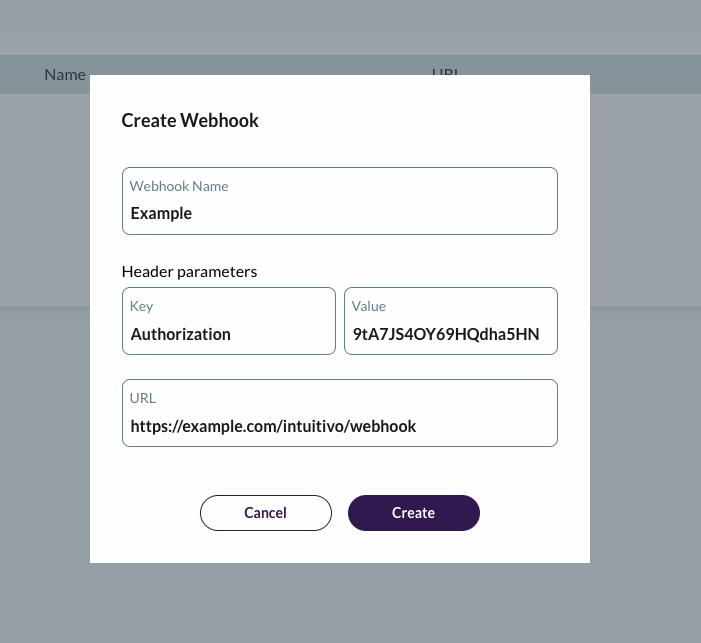
Receiving notifications
When there is an update on a transaction, our system will send a notification to your webhook endpoint. The notification will include a JSON payload with the following structure:
{
  "object": "event",
  "type": "transaction.update",
  "data": {
    "id": "<string>",
    "status": "<string>",
    "customer": {
      "id": "<string>"
    }
  },
  "updated_at": "<Date>"
}
Here's what each field means:
| Key | Description |
|---|---|
| object | Object representation: "event" |
| type | The type of event that occurred (in this case, transaction update). |
| data | An object containing information about the transaction. |
| data.id | Transaction UUID |
| data.status | Transaction status: "active", "pending", "processing", "completed", "cancelled" |
| data.customer | Customer Object |
| data.customer.id | Customer UUID |
You can use this information to update your own records and provide real-time feedback to your customers.
Transaction status
active: transaction is active until the customer close the cooler.
pending: customer closed the door and transaction is in process queue.
processing: transaction is processing in our verification pipeline.
completed: transaction has been successfully processed through our verification pipeline.
cancelled: customer didn't take out any product or did not open the cooler.