
Site Connectivity Assesment
Before deploying A-POPs using Intuitivo's built-in connectivity solution — whether a SIM embedded in the computer or a dedicated router with SIM card — always assess signal conditions at the installation site in advance. Units are typically staged and tested in a warehouse, but field conditions vary significantly: hospital basements, enclosed shopping areas, and spaces surrounded by thick concrete walls are common challenging environments.
Simulate Before You Go
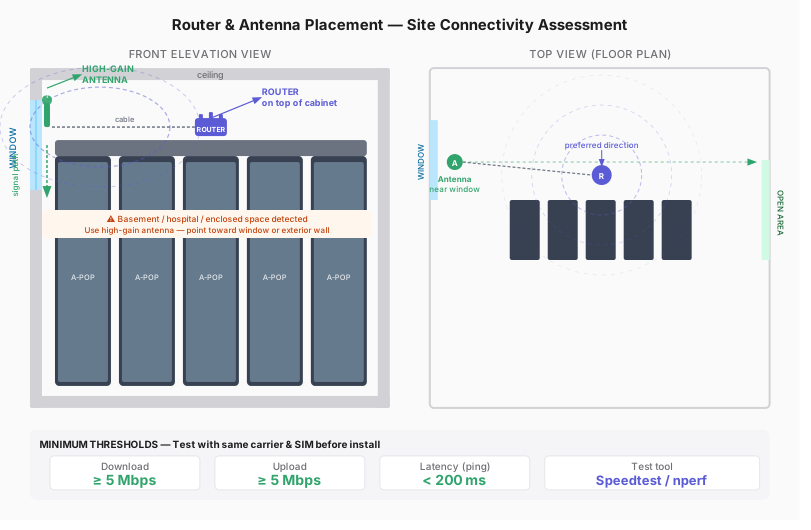
Run your connectivity test using the same carrier and SIM type that will be installed in the field. Bring a test router or hotspot on the same network — don't extrapolate from your phone's signal or a different carrier. Test from the exact spot where the APOP will stand.
Section: What to Measure
Use Speedtest.net or nperf. Run the test at least 3 times and check for consistency — a single good result can be misleading. If latency spikes or speed varies wildly between tests, the connection is unstable.
Router and Antenna Placement
Place the router on top of the A-POP cabinet, not inside or behind it. If signal is weak, connect an external high-gain antenna via cable and position it as close as possible to a window, open corridor, or exterior wall — the goal is line of sight to the nearest open space. In enclosed or basement environments, antenna placement makes a bigger difference than router specs. A directional high-gain antenna pointed toward the building's exterior can recover several dBm of signal.
Red Flags — Reconsider the Location
Flag these conditions before install day — they often require antenna upgrades or alternative connectivity solutions: basement or sub-basement locations, rooms with no exterior walls or windows, locations reported as dead zones by site staff, or anywhere your test drops below the minimum thresholds consistently.